Foot Analysis System

At a glance
The Foot Analysis System is a Foot Clinik-branded desktop application—developed by BotNET IT—for clinics, podiatrists, orthopaedic teams, and gait labs. Secure clinic ID login and franchise identity on the interface ensure every scan runs through an authorised setup. Paired with a purpose-built pressure walking surface, it delivers patient management, Standing Test and Walking Test capture, real-time pressure maps, arch and roll analysis, Fick angle gait assessment, and professional PDF reports—stored locally on your clinic workstation. Final specifications and commercial terms for your site are confirmed with Foot Clinik.
Many foot, ankle, and walking problems are easier to understand when you can see and measure pressure under the feet—not only observe from the side. The Foot Analysis System turns a dedicated pressure-sensitive walking surface into a guided workflow: identify the person, run the test, review the results, and keep a record you can return to later or share as a professional report.
From capture to report — one connected workflow
The pressure plate captures ground reaction patterns in high detail; the Foot Analysis System turns that data into on-screen views your staff can use live with patients, and into documentation your clinic can file or hand out. Together they offer the Standing Test and Walking Test: study how load is distributed while standing, how contact changes, and—during walking capture—how pressure moves through the phases of each step. 4D-style insight means measurement across space and time: you see not only where force is high, but how it evolves—ideal for education, care planning, and follow-up in the Foot Clinik network. Saved sessions can be replayed frame-by-frame on the clinic workstation without needing cloud connectivity.
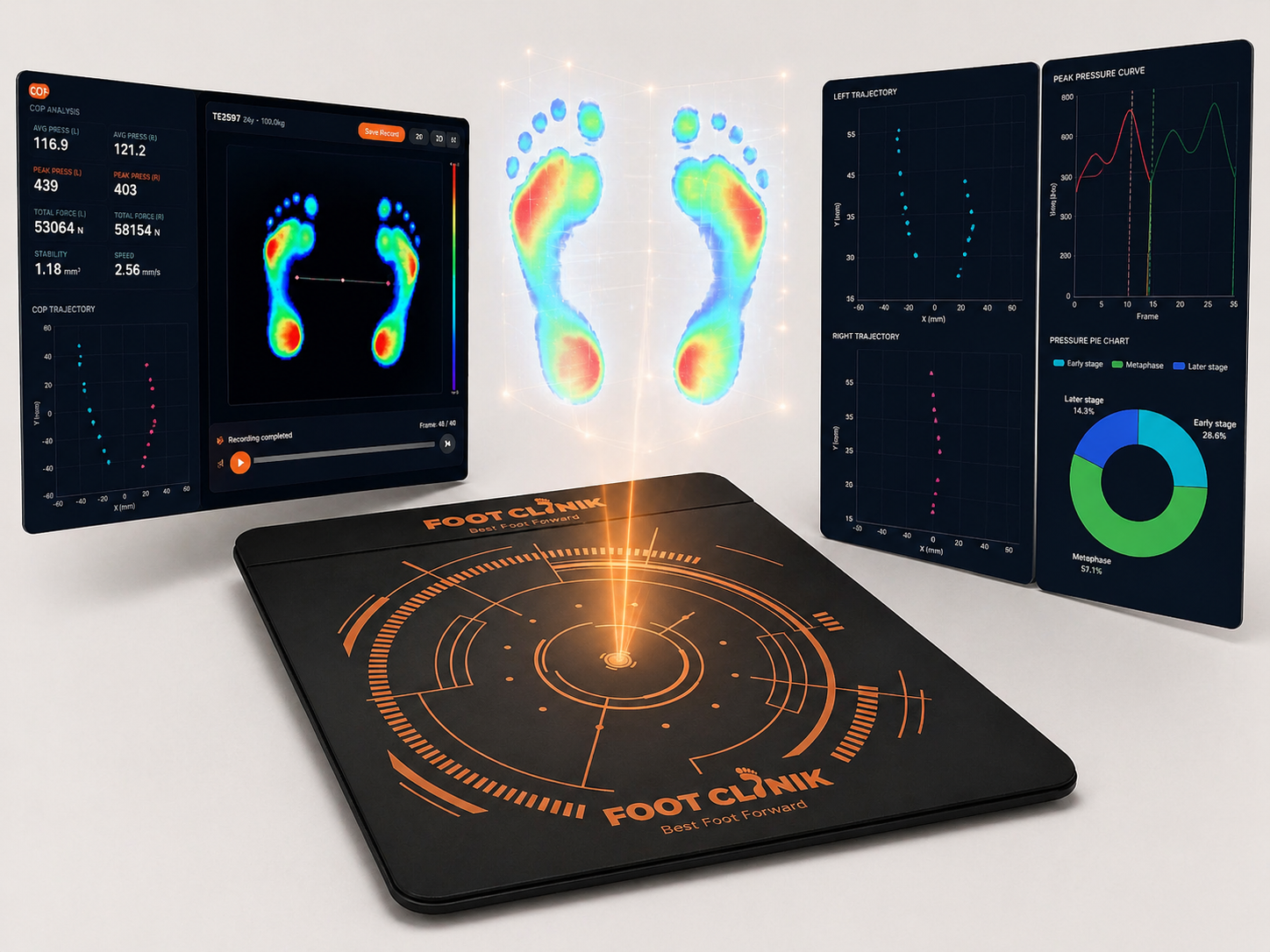
What the system analyses & shows live
Raw sensor data becomes classified, report-ready findings—2D and 4D pressure maps, arch and roll scales, and gait metrics your team and patients can read at a glance.
Arch type detection
Classifies each foot as high, normal, mild flat, or flat from midfoot pressure contact—with per-foot arch pressure %, zone breakdowns, and High-to-Flat scales on the Standing Test report.
Foot roll detection
Shows inner vs outer loading with medial/lateral breakdown, inner-side pressure %, and Supinated-to-Pronated scales for each foot while standing still.
Fick angle analysis
Guided right-to-left walking with step counter and live left/right panels. Classifies pigeon-toed, normal, or duck-footed—with historical COP trajectories, timeline playback, and export controls.
Real-time pressure map
Grid-based 2D maps with blue-to-red zones for both feet during capture. Live heel, forefoot, arch, and toe contact with separate left and right visibility.
4D pressure surface
Switch to 3D/4D elevated surfaces after recording—high-pressure peaks show depth and intensity over time. Review center-of-pressure, left-right balance, and gravity center on the Standing Test report.
A guided day on the system
Built so reception and clinical staff share one consistent flow: fewer missed steps, clearer handovers, a premium Foot Clinik feel at every visit.
Clinic login & secure access
Sign in with clinic ID and password. Forgot-password recovery is available. Your clinic or franchise identity is shown on the Foot Clinik-branded application shell so every scan runs through an authorised setup.
Connect the pressure plate
The program expects the scanner hardware via USB. If it is not connected, staff are guided to plug it in; the software reconnects automatically when the device is available.
Find or register the patient
Search by name or mobile, or add a new patient with personal details (DOB, weight, height, gender), clinical observations, chief complaint, remarks, preferred report language, and left/right foot size—so every session is traceable and report-ready.
Choose Standing Test or Walking Test
Select the Standing Test for weight distribution, arch, and roll analysis while still—or the Walking Test to study gait, Fick angle, and COP trajectory during movement. On-screen guided protocols walk staff through each test.
Capture with live views & stable contact
For the Standing Test, wait for stable contact confirmation before recording. Live pressure maps show pressure in real time. For the Walking Test, follow the guided step sequence with live preview and captured step thumbnails.
Review, save, and export reports
Replay recordings frame-by-frame, switch to 3D/4D surface views, rescan if needed, then save to the patient file. Generate multi-page PDF reports for the Standing Test or Walking Test—open in browser, download, or print for consultation and follow-up.
Standing Test & Walking Test
Two guided capture modes—study pressure while still, then analyse gait in motion. Select any screen below to preview what staff and patients see on the clinic workstation.
Standing Test — pressure while still
The Standing Test captures how body weight is distributed across both feet while the patient stands still on the pressure scanner—helping identify pressure imbalance, arch condition, and foot roll pattern.
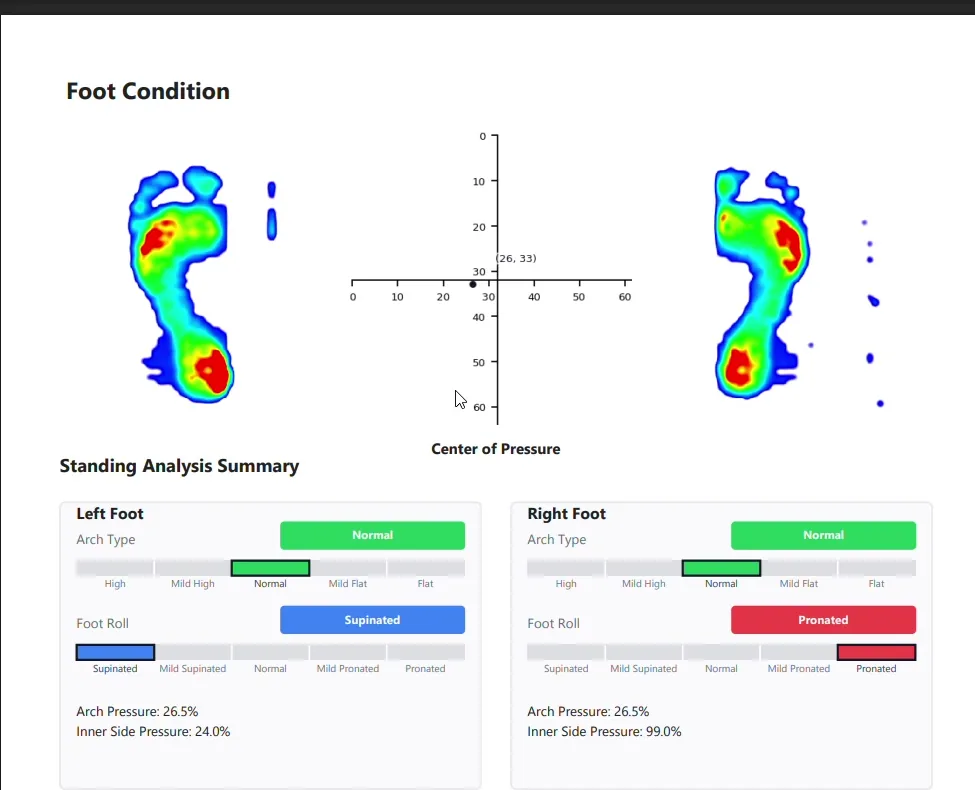
Arch & roll report summary
Combined Standing Test report with 2D pressure map, center of pressure, arch type scales, and foot roll classification for left and right feet.
Walking Test — pressure in motion
The Walking Test records foot pressure during movement to study gait pattern, step behaviour, and walking alignment. Step-by-step guided capture collects consistent data from both feet.
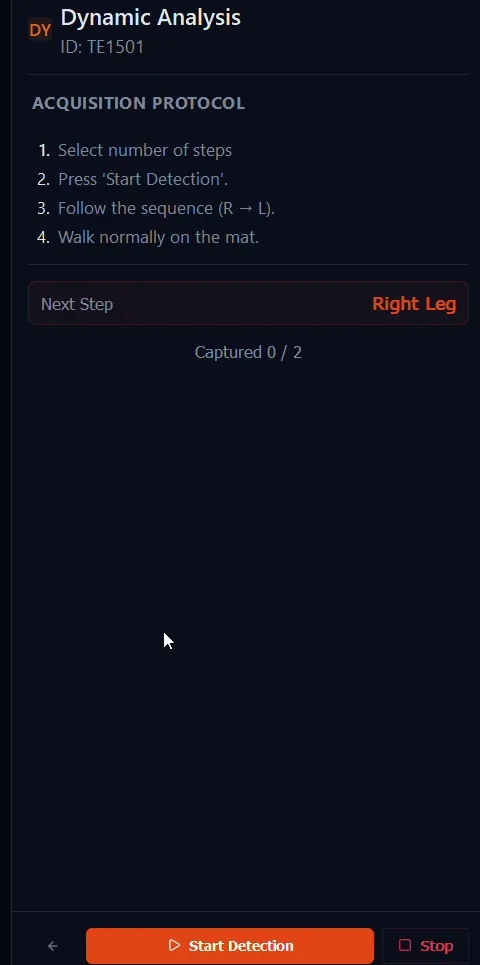
Guided walking sequence
Step-by-step right-to-left walking protocol with step counter and individual footstep thumbnails.
Patient records & clinic setup
Every patient gets a digital scan profile—search, register, and track Standing Test and Walking Test history, clinical fields, and previous reports in one local workstation.
Patient list dashboard with search by name or mobile number
Auto-generated patient ID, registration date, last visit date, and total scan count
Separate counts for Standing Test and Walking Test scans per patient
Add, edit, delete, and view patient records with a summary panel before each scan
Registration captures name, mobile, date of birth, auto-calculated age, weight, height, and gender
Clinical fields: chief complaint, observations, remarks, preferred report language
Left and right foot size recorded for more meaningful scan reports
Inspection records list with date, test type, preview, and report access for follow-up comparison
Built for a modern, busy clinic
Secure clinic-based login with clinic ID, password protection, and forgot-password option.
Guided on-screen protocols for Standing Test and Walking Test make the scan process simple and consistent for clinic staff.
Light and dark interface themes, multiple languages, and adjustable text size for different screens and rooms.
Noise handling controls and optional screen-transition polish for readable live views and a premium patient-facing experience.
Local on-site operation: patient records, saved scans, and PDF reports stored on the clinic workstation.
Patient summary panel shows scan counts, clinical notes, and foot sizes before each test begins.
Records & professional documentation
Professional scan reports can be generated instantly and shared with patients for consultation and follow-up. Completed assessments are stored in the patient history with Standing Test and Walking Test records, date/time stamps, and report access for progress comparison. Reports are provided as an aid to documentation; the treating clinician is always responsible for final interpretation and clinical decisions.
Standing Test PDF report includes
Report cover with clinic branding, patient details, weight, height, gender, and age
2D foot pressure map and center of pressure visualisation
Left and right arch type with arch pressure percentage
Left and right foot roll with inner-side pressure percentage
Foot pressure area and section-wise pressure distribution
Left/right and front/back pressure distribution
Gravity center distribution with visual indicators
Standing analysis summary and reference note
Walking Test PDF report includes
Patient details and inspection date/time
Left and right foot pressure visualisation with zone-wise reference
Fick angle analysis with standard value comparison per foot
Pigeon-toed / normal / duck-footed scale with left and right results
Historical COP trajectory for left and right feet
Footstep sequence thumbnails and movement path representation
Why teams choose the Foot Clinik system
As with any professional clinical system, on-screen and printed outputs support documentation; the qualified clinician is responsible for all diagnostic and treatment decisions.
Clinicians get measurable arch type, foot roll, and Fick angle data alongside the physical exam—without a steep learning curve.
Front desk and support staff follow a guided, step-by-step flow with fewer handover mistakes.
Patients understand their condition more clearly when it is visualised, not only described.
Clinic leaders keep organised files, reportable outcomes, and on-brand documentation in the Foot Clinik ecosystem.
A complete workflow—not a loose sensor—so training is faster and outcomes stay consistent between rooms.
Hardware and software tuned together, with updates and deployment models for larger groups.
Patient-facing visual clarity that supports orthotic, footwear, and rehab plans in your own ecosystem.
Non-ionising, office-friendly technology for day-in, day-out use in busy practices.